HIPAA and AI in healthcare marketing require a workflow review before patient information enters a tool. Identify the information, the recipient, what happens to it and who approves the use.
Start with a documented workflow. Public service descriptions and fictional examples can support a useful drafting process without giving a new tool patient records. Before a new workflow uses PHI, have the appropriate privacy, security and legal reviewers assess it.
PHI means protected health information. HIPAA applies to covered entities and their business associates, not every business that handles health-related information. It is not limited to a person’s name. Review the full information and context before deciding what a tool may receive.
This article provides general marketing guidance, not legal advice. Your privacy and security leaders and qualified counsel should evaluate the specific organization, data and use case.
Map the information before choosing the tool
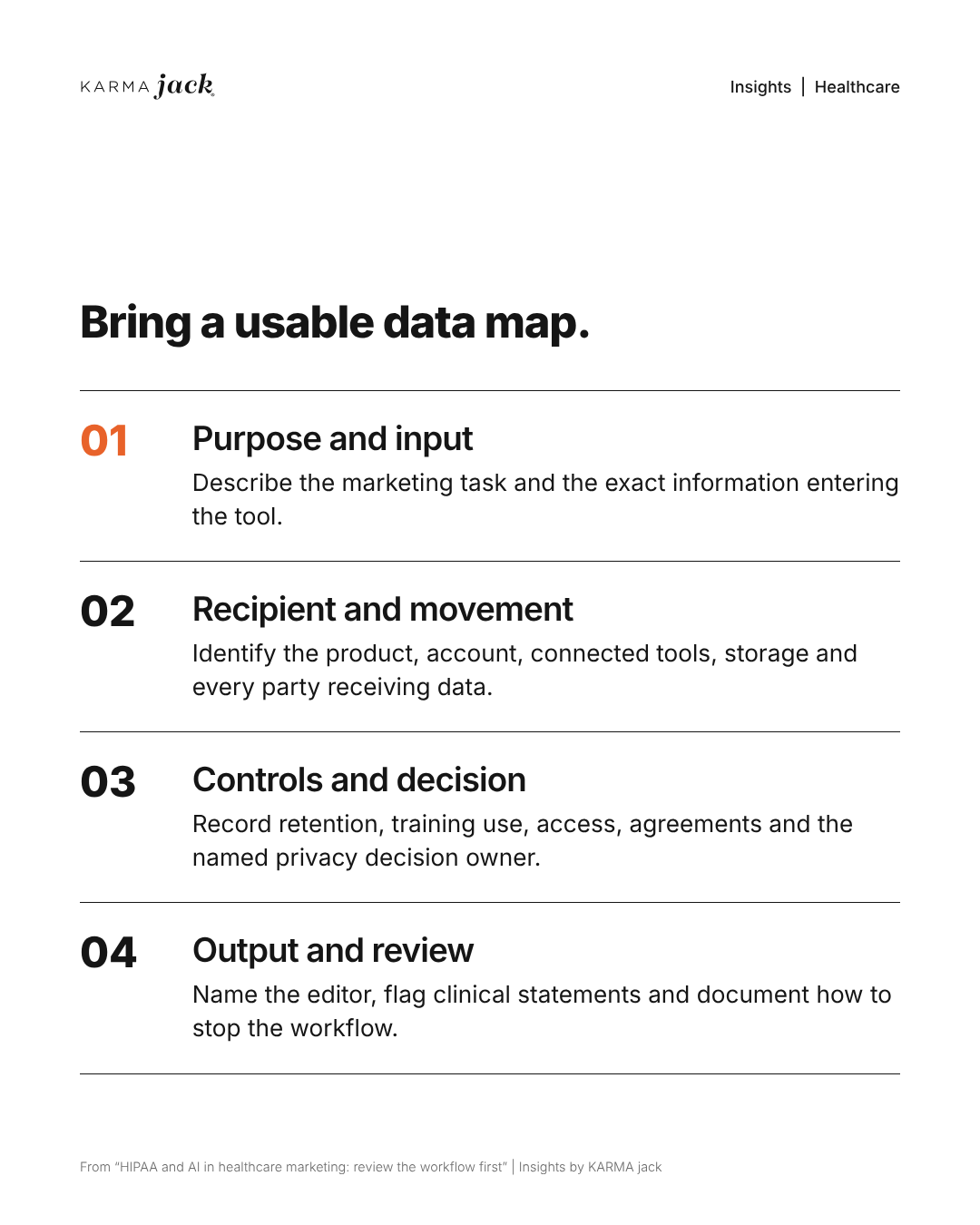
Start with one real task, such as drafting a service page or summarizing appointment requests. Put marketing, IT and the privacy lead in the same review. Write down the path information would take from its source to the finished output, including any systems that receive a copy along the way.
Build a short worksheet with these six fields:
- Task and owner: What should the tool do, and who is responsible for approving the workflow?
- Exact inputs: List the fields, files and prompts it would receive. “Website data” is too broad. Specify names, email addresses, appointment dates, reasons for visits, page addresses, recordings or free-text messages.
- Every destination: Identify the AI provider, connected apps, browser extensions, analytics platforms, support systems and logs that could receive the information.
- Access and retention: Record who can see the data, where it is stored, how long it stays, whether it can be used for model training and how deletion works. Verify these answers against the actual product and account settings.
- Output and audience: Identify where the result will go and who will review it. A draft inside an approved workspace and a response automatically emailed to a patient need different reviews.
- Approval and stop conditions: Name the privacy, security and legal reviewers needed for that use case. Document what staff should do if restricted information enters the tool or an unapproved connection appears.
For example, a service-page project could use an approved public page and fictional questions, produce a draft in an approved workspace and end with a staff review before anything is published. An appointment-request project might receive a person’s name, contact details and reason for seeking care, then copy those details into a chatbot, CRM and email notification. That second workflow needs review before patient information enters any new system.
Use fictional test records to check the proposed path. Compare what actually moves between systems with the worksheet. If the team cannot identify a destination or explain why a field is needed, keep that connection off until it has been reviewed. Treat patient-related information as restricted while the responsible team assesses it.
Is a business associate agreement enough?
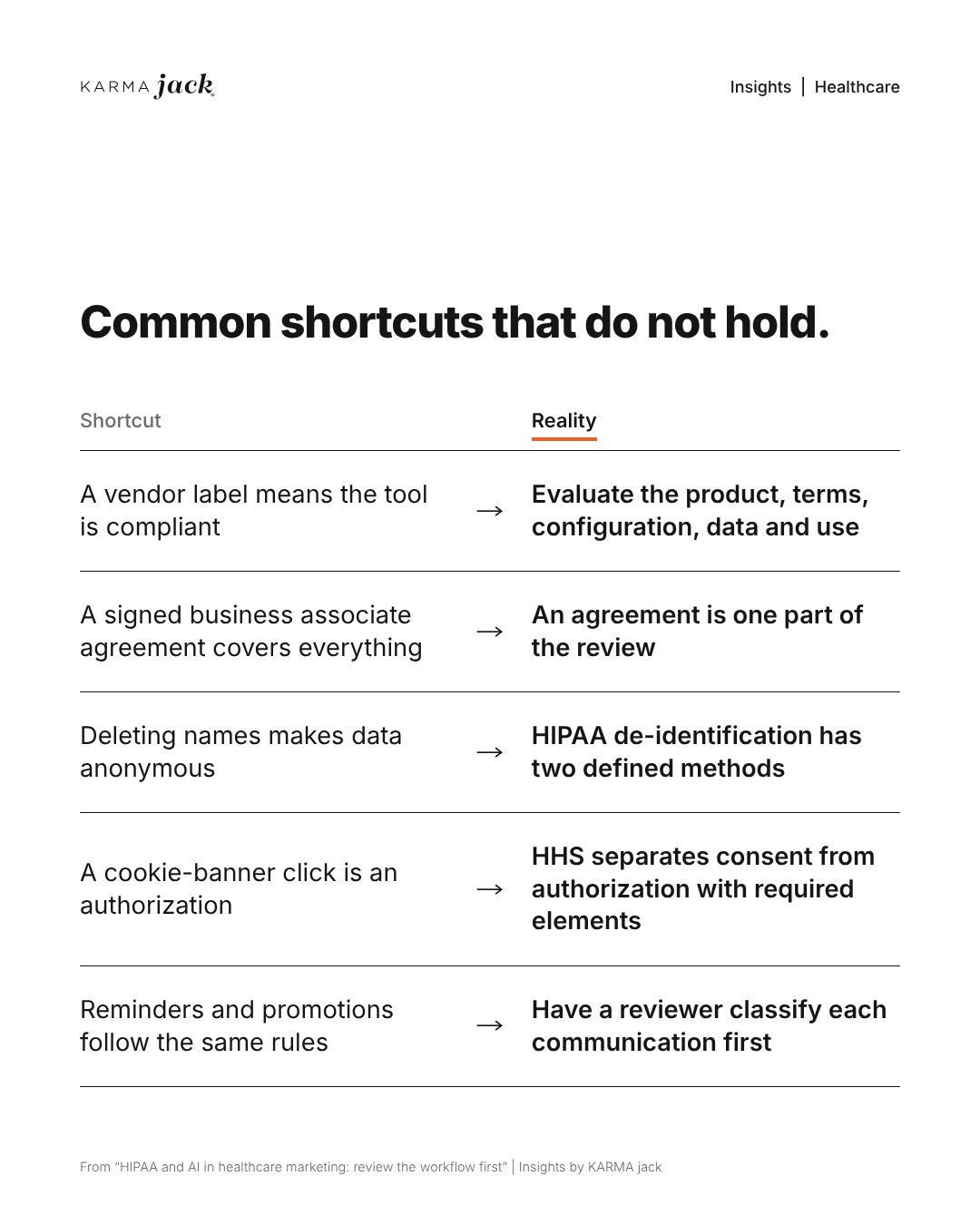
A business associate agreement is a contract that sets out permitted uses of protected health information and the responsibilities of the covered entity and its business associate. It is one part of reviewing the actual workflow.
HHS explains that a cloud service handling electronic PHI on behalf of a covered entity can be a business associate even when it cannot decrypt the information. Appropriate agreements and risk management obligations still apply. See HHS cloud computing guidance.
Confirm that any agreement covers the actual product, account configuration, connected features and intended use. Review access controls, retention, subcontractors, incident reporting and deletion procedures. A signed agreement does not by itself establish that the full workflow complies with HIPAA.
Separate marketing from treatment communications
HHS says uses or disclosures of PHI for marketing generally require written authorization, with limited exceptions. Whether a communication falls within an exception depends on the facts. Review the HHS marketing guidance before building audience lists or automated outreach.
Do not assume an appointment reminder and a promotional campaign have the same rules. Have the appropriate reviewer classify the proposed communication, its audience and any related data sharing before an automation is enabled.
Review tracking, consent and de-identification separately
Review website tracking alongside the AI workflow. A chatbot may be carefully configured while a pixel, session replay tool or form integration sends information to another vendor. Give this review a named owner and complete it before adding new tags or connecting website activity to AI tools.
Check what each pixel and form actually sends
Start with appointment forms, patient portals, symptom tools, chat widgets and confirmation pages. Then review public service pages. Ask the web team to inspect outgoing requests using fictional test data and document:
- Which tools load on each page and which companies receive information.
- Whether requests contain form answers, email addresses, appointment details, page addresses, URL parameters or device identifiers.
- Whether information leaves the site when a page loads, while someone types, when a form is submitted or after the confirmation page appears.
- Whether a server-side integration sends additional information that the browser test does not show.
For example, a clinic might want to count appointment requests from an ad campaign. Its confirmation-page event could also send the selected service and an identifier to an advertising platform. Have the team inspect the actual event before treating it as a harmless conversion count. An aggregate dashboard does not show everything the vendor received.
Does a cookie banner count as HIPAA authorization?
A cookie-banner click does not supply a valid HIPAA authorization. HHS also explains that a privacy notice alone does not permit a disclosure of PHI. Where authorization is required, the organization needs a HIPAA-compliant authorization before the disclosure, along with review of the applicable data-handling obligations. See the HHS tracking technology guidance.
HHS distinguishes ordinary consent from an authorization with specific required elements. Its consent and authorization FAQ explains the distinction.
Run separate tests before making a choice, after rejecting optional tracking and after accepting it. Check withdrawal behavior too. Confirm that the technical behavior matches the choices offered. If a banner promises that optional advertising tags stay off until acceptance, verify that they actually stay off. Passing that technical test still leaves a separate question for privacy and legal reviewers: may this particular information go to this particular recipient for this purpose?
Keep optional advertising tags off sensitive workflows while that decision is unresolved. Document the approved events and permitted fields, then retest when a form, plugin, tag or integration changes.
Public pages require a fact-specific assessment. HHS notes that in American Hospital Association v. Becerra, No. 4:23-cv-1110 (N.D. Tex. June 20, 2024), the court vacated its guidance only to the extent it treated an individual’s IP address combined with a visit to an unauthenticated public webpage about specific health conditions or healthcare providers as triggering HIPAA obligations. Avoid labeling every public-page visit PHI or treating every public-page disclosure as unrestricted.
Other privacy obligations may also apply. The FTC’s health information guidance addresses unfair or deceptive data practices and explains that its Health Breach Notification Rule covers certain personal health record businesses outside HIPAA. Ask counsel which requirements apply to the organization and the proposed use.
Verify de-identification before sharing
HIPAA provides two de-identification methods: Expert Determination and Safe Harbor. Safe Harbor requires removal of specified identifiers and no actual knowledge that the remaining information could identify someone. Expert Determination requires a qualified expert’s documented assessment that identification risk is very small. The HHS de-identification guidance explains both.
Deleting a name, hashing an email address or showing only totals in a report does not by itself establish that the underlying data is de-identified. Review free-text answers, dates, URLs and combinations of details too. Have the responsible reviewer document the method, the data covered and the approved destination.
The order of operations matters. A vendor’s promise to remove PHI after receiving it does not resolve whether the original disclosure was permitted. Before enabling a pipeline, verify what leaves each system and where any approved de-identification happens. Keep privacy, security and legal reviewers responsible for the final decision.
Start with a bounded drafting process
A useful first project is drafting a general service-page outline from approved public material. Give the tool no patient examples. Have a staff editor check the facts, send clinical statements to a qualified reviewer and retain the approved version. Document who can change the process.
Then test failure cases. What happens if someone pastes restricted information, asks a clinical question or connects an unapproved tool? Staff need a clear way to stop work and escalate concerns.
Common question: is an AI tool HIPAA compliant?
Not by its label alone. Evaluate the product, its terms and configuration, the data involved and how the organization uses it. A vendor label does not authorize uploading patient information.
What should a healthcare AI data-flow worksheet include?
Record the task and owner, exact inputs, every destination, access and retention, output audience, and approval and stop conditions. Test the path with fictional records before patient information reaches a new system.
Does removing a name make healthcare data safe to share?
Not by itself. Free text, dates, URLs and combined details can still identify someone. Have the responsible reviewer assess and document an applicable de-identification method and the approved destination before disclosure.
Why review website tracking alongside an AI tool?
Forms, pixels, logs and integrations may send information to other recipients even when the chatbot is carefully configured. Inspect actual outgoing data with fictional tests and obtain the required privacy, security and legal review for the workflow.
Talk with KARMA jack about the marketing workflow you want to improve. Keep compliance decisions with your qualified privacy, security and legal reviewers.